Blogging 101 – Use Google Image Search for Copyright Infringement
Ok, think for a moment how much time it takes to put together a blog post. You cook, bake, craft, play, build, review… whatever it may be. Then, you sit down and write, properly SEO your post, and begin to edit pictures you took along the way.
Google Image Search
If you are like me, the picture edits can take up most of your blogging time. I am HUGE on pictures. Now, imagine if you will, after you hit publish you search your images only to discover that someone, somewhere out in the blogosphere stole your picture.
Hmmm… what would you think? What would you do?
Unfortunately, I have seen A LOT of this going on lately. And it’s not pretty. Nor is it morally ethical… and in some instances… it’s downright illegal. I think my blogging friend over at J-Man and Miller Bug put it best when it comes to copyright infringement:
If you don’t write it and don’t shoot it, don’t steal it!
Simple, right? Apparently not since it seems to be a growing trend.
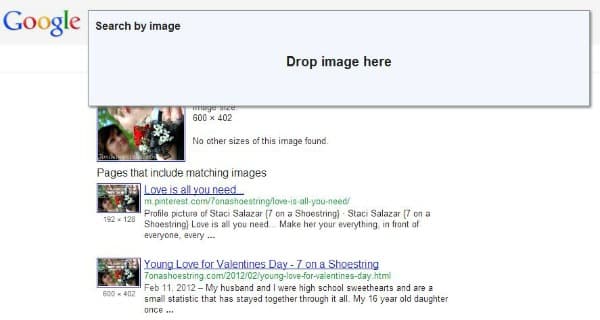
So, how can you find out if someone stole your pictures? Do a quick Google image search. In fact, Google has made it fairly easy to do. It is truly as simple as a quick drag and drop of your image. Let’s take a walk through.
Just as I mentioned, open up the Google image search page: http://images.google.com/ Then open your image folder on your computer and drag and drop the image you want to check into the search bar along the top. And you will see the results below.
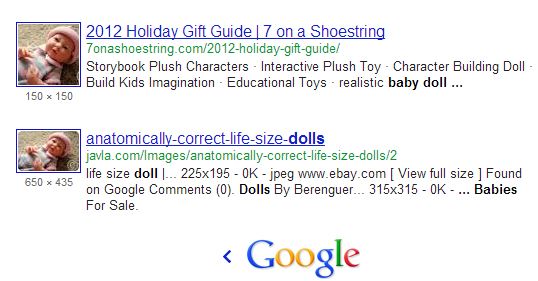
You will easily be able to see if your image is being used elsewhere. The image will be shown in a thumbnail on the left with the website’s URL on the right. This makes it pretty easy to see that your photo is being used elsewhere. But what do you do now?
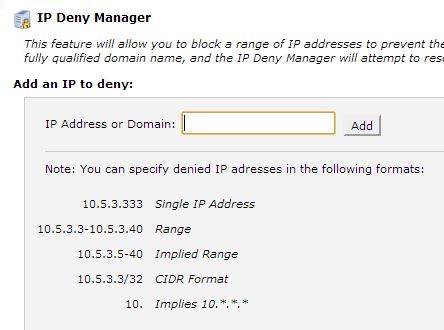
IP Deny Manager
I found that most of my pictures were stolen for image content scarpers sites in foreign countries. There were a few that other bloggers had grabbed but I ended up with 12 different photo sites that were using my pictures. Some of them of my children.
This bothered me most.
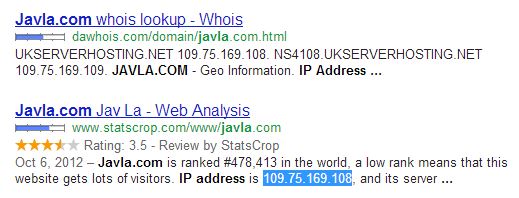
Therefore, I decided to use the IP Deny Manager within my CPanel to keep the sites from visiting my blog. (This can also be done through your .htaccess file but this way is much easier if you have the capability to use it.)
Look up the IP address of the site you are looking to block.
Go into the IP Deny manager in your CPanel and simply insert the offending IP address. Click add and you are all done. It rewrites your .htaccess file for you and you are done.
Cease and Desist
What if you find that another blogger or reputable site is using your image?
What if you want to directly contact them and ask them to remove the image before taking further action due to copyright infringement. I admit, it is a chore to have to do.
But, remember all the work you put into it? Is it really fair for them to gain exposure, earn money, get all the credit for your hard work? Yeah, I don’t think so either.
Now, there were a few images that bloggers took that I was okay with. Plus, there were images I had given others permission to use. No big deal. They asked and I had no problem with it (because they were kind enough to ask).
Now you need to send a “Cease and Desist.” It can be as simple or as technical as you want. I always try to ask nicely first (and have not had to move past that stage yet).
Some people really do not know the proper etiquette. Yet, those that blatantly remove your watermark obviously know… and may require more. Here is just one example of what you could send:
It has come to my attention that you are using copyrighted and protected material on your website. Your illegal use of this photo at this URL can be found in its original form on my website at your link ;. I am the photographer and copyright holder of this particular photo. Any use of copyright protected material without the owner’s permission is illegal under copyright laws.
I would advice you to take one or more of the following actions immediately:
include a link and proper credit to the original content on my site;
provide compensation for use of my copyright protected material;
remove the copyright protected material immediately and notify me in writing that you have done so.
If I have not received a response within 7 days of this notice, I will be forced to take further legal action. Thank you for your immediate attention on this matter.
Again, it may not be a fun process to work through, but your time and value is definitely worth it in the end. Whether it be content or photos, stealing from others is just not right.
I also found this great resource on how to protect your photographs (although nothing is 100% fool proof… where there is a will there is a way).
We live in Texas, Ya’ll. In case you missed the movie and subsequent TV show afterwards, it’s all about Friday Night Lights and the “Boys of Fall” around here. You know, “America’s Team” and all. I could go on and on about how HUGE football is around here. But, just as important as the game…
With 4 daughters, you better believe I have a few that thoroughly enjoy their spa days. So much so that they often find ways to create a spa day at home. And as their mom they make me proud, it’s all about research for them. Yes, the 9 and 11 year old, Jaci and Jaden,…
I have heard others speak of Advent Calendars for years and have always wanted to put one together but have not done so yet. But, with Pinterest, my creative bone has once again sparked an interest {how can you not be inspired on that site?!} Therefore, I have been looking around and pinning some ideas for a…
Will you be doing any holiday hosting at your home this year? Whether you have family coming over for the day or a few days, I am sure you want to make sure your house is in order. Preparing your Home for Holiday Hosting Holiday hosting can be as fun or as stressful as we…